
To start accepting credit cards, you need a way to capture payment information (like a terminal or online checkout), a payment processor to handle the transaction, and a merchant account where the money can be deposited.
Most modern solutions, like an all-in-one payment provider or an integrated Point of Sale (POS) system, bundle everything you need to handle payments in-store, online, or on the go.
Your Options for Credit Card Acceptance
Figuring out how you’ll accept cards is one of the first decisions you will make. It impacts your customers’ checkout experience and your day-to-day operations. Accepting cards is not a choice anymore—it’s an expectation.
Look at the numbers. The number of credit card accounts in the US jumped from 596.35 million to 617.41 million in one year. With credit cards making up 35% of all payments, you cannot afford to turn away that business.
The right setup boils down to where you meet your customers. A seasonal fireworks stand has different needs than a multi-location pet store chain. A beer distributor taking wholesale orders online needs a different set of tools than a vendor at a weekend farmer’s market.
Let’s break down the main ways to take payments so you can build a system that fits your business.
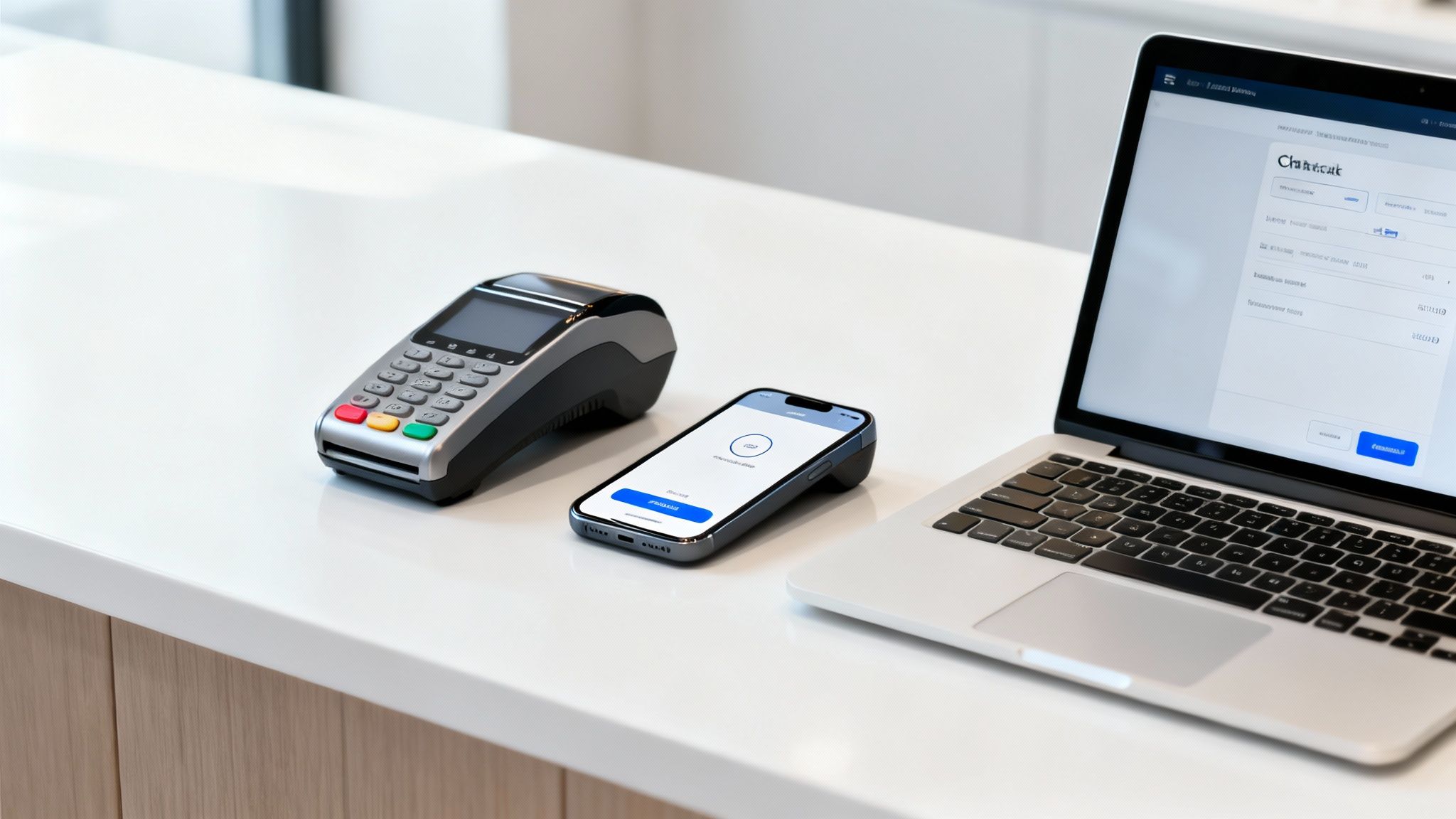
Payment Acceptance Methods at a Glance
Here’s a comparison of the most common ways retailers accept credit cards today.
| Method | Best For | Hardware Needed | Key Consideration |
|---|---|---|---|
| In-Store (POS) | Brick-and-mortar retail stores, restaurants, service businesses with a physical location. | POS terminal, card reader (EMV/NFC), cash drawer, receipt printer. | An integrated system connects sales directly to inventory and customer data, which saves time. |
| Online (E-commerce) | Businesses selling products or services through a website. | None (software-based). A payment gateway is required. | Security is paramount. Ensure your setup is PCI compliant and offers fraud protection tools. |
| Mobile (On-the-Go) | Pop-up shops, trade shows, farmer’s markets, mobile service providers (plumbers, etc.). | Portable terminal, virtual terminal. | You’ll need a reliable cellular or Wi-Fi connection to process payments in the field. |
Each method solves a problem, but many businesses end up using a mix of two or all three to cover their bases.
Taking Payments In-Store
For any business with a physical storefront, this is your primary method. Your main tools here will be countertop terminals or a fully integrated Point of Sale (POS) system.
- Countertop Terminals: These are the standalone credit card machines you’ve seen everywhere. They get the job done by connecting to a processor to authorize a sale. The downside is they operate in a silo, separate from your sales reports or inventory. That means you are doing manual data entry at the end of the day to make sure everything matches up.
- Integrated POS Systems: This is the modern approach. A system like Pomodo weaves payment processing directly into your sales, inventory, and customer management. When a customer pays, the transaction is logged instantly and automatically. This eliminates manual reconciliation, cuts down on human error, and gives you a single, accurate view of your business. You can see how integrated credit card processing creates a smoother workflow.
Accepting Payments Online
If you’re selling online, you’re opening your doors to the world. To do that, you need a payment gateway. Think of it as the digital version of a physical card terminal—it’s the secure tech that grabs the card info from your website and sends it off to the processor.
Most e-commerce platforms have gateways built-in or offer plug-and-play integrations. For a business like a beverage distributor, an integrated system is a benefit. An online order can flow directly into their main inventory software, which makes fulfillment a breeze with zero extra data entry.
The Key Players in a Transaction
No matter how you take the payment, there are three components working behind the scenes. Knowing who’s who will help you when it’s time to choose a provider.
- Merchant Account: This isn’t your business checking account. It’s a type of account required to accept card payments. Approved funds from your sales are held here for a short time before being transferred to your main bank account.
- Payment Processor: This is the company doing the work. They are the ones who securely shuttle payment data between your business, the card networks (like Visa and Mastercard), and the customer’s bank to get a “yes” or “no” on the charge.
- Payment Gateway: As we mentioned, for online sales, this is the secure bridge for payment data. In a physical store, your POS terminal or card reader plays a similar role.
Making Sense of Processor Pricing Models
Your processor’s pricing structure is one of the most important things to get right. It dictates how much you’ll pay on every transaction. Most processors use one of three models.
Interchange-Plus: This is the most transparent model. The processor charges you the direct “interchange” fee set by card networks like Visa and Mastercard, plus their own fixed markup. You can see what you’re paying them. It’s a good fit for businesses with steady, high-volume sales.
Flat-Rate: This one keeps things simple. You pay one percentage for every transaction, no matter what kind of card is used. PSPs use this approach. While it’s predictable, it can be more expensive if you process a lot of debit cards, which have lower base fees.
Tiered: With this model, the processor buckets interchange rates into different tiers—think “qualified,” “mid-qualified,” and “non-qualified”—and applies a different rate to each. The problem is, it’s often a mystery which tier a transaction will fall into, which can lead to surprises on your statement. This model is becoming less popular because of its lack of transparency.
For most small and mid-sized businesses, the choice between interchange-plus and flat-rate comes down to sales volume versus predictability. A shop with unpredictable sales might prefer the simplicity of a flat rate. A larger operation can often save money with the transparency of interchange-plus.
Why Integrated Processing is a Game-Changer
A decision you’ll face is whether to pick a processor that integrates with your Point of Sale (POS) system. An integrated system connects your payment terminal directly to your sales and inventory software, creating one workflow.
This connection means no more punching in transaction amounts on a separate card terminal. That alone cuts down on human error. Every sale is automatically logged in your POS, keeping your financial reports and inventory counts accurate in real-time.
For businesses with multiple locations or an online store, this integration is non-negotiable. Look at the scale of the major card networks; Visa recently reported an 11% net revenue jump to $40 billion, fueled by an 8% surge in payments volume. That’s the flow of transactions your business is tapping into. Whether you’re a fireworks store managing an e-commerce site or a beer distributor juggling inventory across multiple locations, integrated processing makes sure every order flows into your main system for fulfillment.
Choosing the Right Hardware for Your Business
Your hardware is the physical link between your customer and the payment network. The right gear makes checkout fast, secure, and painless.
At a minimum, you’ll need equipment that can handle how people pay today:
- EMV Chip Card Readers: A must for security. These readers process the chip on cards to protect against fraud.
- Contactless (NFC) Terminals: These let customers tap their card or phone (think Apple Pay or Google Pay) to pay, which helps keep lines moving.
- Mobile Card Swipers: Small, portable readers that connect to a smartphone or tablet via Bluetooth are perfect for selling at fairs, markets, or anywhere outside your four walls.
Navigating Security and PCI Compliance
The moment you start accepting credit cards, you take on a responsibility: protecting your customers’ payment information. This isn’t a suggestion; it’s a set of mandatory rules every business has to follow.
The rulebook for this is the Payment Card Industry Data Security Standard (PCI DSS). Think of it as a collection of security practices designed to make sure any company that accepts, processes, stores, or transmits credit card info is doing it in a secure environment.
Ignoring these rules can have severe consequences. A data breach damages your reputation and can bring on fines from card brands and banks. For a small or mid-sized business, those penalties can be a gut punch.
Breaking Down PCI DSS Requirements
At its heart, PCI DSS is about stopping credit card fraud. While the full standard has 12 requirements, for a retailer, it boils down to a few areas of focus. Getting compliant means you’re taking the right steps to keep cardholder data safe.
The journey starts with a Self-Assessment Questionnaire (SAQ). It’s a document that helps you check the boxes and prove you’re compliant. The SAQ you need to fill out depends on how you process payments.
For instance, a business using a standalone terminal that connects through a phone line will have a different set of rules than a pet store with an internet-connected POS system. Using a compliant, integrated solution simplifies things.
Partnering with a PCI-compliant payment processor and using validated hardware shifts most of the security and compliance burden off your shoulders and onto your provider. They manage the heavy lifting and tech, so you can focus on running your business.
This partnership is a benefit. Your provider maintains the secure networks and systems that handle the data, which shrinks your scope of responsibility.
Your Path to Compliance
For most retail businesses, becoming compliant is a mix of using the right tech and adopting secure business practices. It’s not a one-time task, but an ongoing commitment to security.
Here are the actions you need to take:
- Use Compliant Hardware and Software: Stick to payment terminals and POS software that are validated as compliant. These tools are built with security features like encryption to protect data from the moment a card is swiped, dipped, or tapped.
- Lock Down Your Network: If your payment system connects to the internet, your network needs to be secure. That means using a firewall, changing the default passwords on all your routers and modems, and making sure your Wi-Fi network is password-protected.
- Restrict Access to Data: Cardholder data should only be seen by employees who need it for their jobs. You’ll also want to limit physical access to terminals and other systems.
An integrated POS provider like Pomodo often takes care of these technical issues for you. The software is designed to be compliant, and the payment processing service that comes with it follows all PCI standards. This setup moves data securely and keeps sensitive information off your local system.
Understanding Rates, Contracts, and Processing Fees
Before you agree to terms with any payment processor, you need to understand their fees and contracts. This isn’t just fine print; the costs tied to accepting credit cards can eat into your profit margins, and a contract can lock you into a deal for years. Getting a picture of what you’re paying—and why—is non-negotiable for your business’s financial health.
Customers use plastic. Consumer spending on credit cards is not slowing down. The average unpaid balance recently hit $7,886, and with 35% of all payments now coming from credit cards, you can’t afford to turn those customers away. You can dig into more of these trends in LendingTree’s latest report on credit card debt.
Deconstructing Your Processing Fees
Every time a customer swipes, taps, or clicks to pay, a slice of that sale goes to processing fees. That single “fee” is actually a combination of three different costs. Knowing what they are is the first step to finding a fair deal.
- Interchange Fees: This is the largest part of the fee. It goes to the bank that issued the customer’s credit card. These rates are set by the card networks (think Visa, Mastercard) and are non-negotiable. They change based on the card type, whether it was an in-person or online sale, and other risk factors.
- Assessment Fees: This is a smaller fee paid to the card networks themselves for using their system. Like interchange, this one is non-negotiable.
- Processor Markup: Here’s where you have some power. This is the only part of the fee that’s negotiable and it’s what your payment processor charges for their service. This is how they make their money, and it’s the key difference you’ll compare between providers.
The goal here is to find a processor with a transparent and competitive markup. Pricing models like interchange-plus are good for this because they separate the processor’s markup from the non-negotiable fees, so you can see what you’re paying them for their service.
Navigating Contracts and Avoiding Pitfalls
The contract you sign is as critical as the rates you’re quoted. Some providers use long-term agreements packed with clauses that can become expensive problems down the road.
When you’re reviewing a contract, keep an eye out for a few red flags. The main one is an early termination fee (ETF). Some contracts will try to lock you in for several years and hit you with a penalty if you want to switch providers. Another common trap is an equipment lease agreement. Leasing a terminal might sound like a cheap way to get started, but you often pay more than the hardware is worth over the life of the lease—and you never own it.
This is where an integrated provider offers an advantage. They often offer straightforward, month-to-month terms without these long-term handcuffs, giving your business the flexibility it needs.
Before you get too deep, have an understanding of the most common fees you’ll see on a statement.
Common Payment Processing Fees to Watch For
Here’s a rundown of some typical fees you’ll find on your merchant statements. Knowing what these mean will help you decode your bill and understand where your money is going.
| Fee Type | Description | How It Is Billed |
|---|---|---|
| Transaction Fees | The cost to process a single transaction, a combination of interchange, assessments, and markup. | Per-transaction |
| Monthly Fee | A flat fee charged each month for account maintenance, customer support, and statement preparation. | Monthly |
| PCI Compliance Fee | A fee for services to help you maintain Payment Card Industry Data Security Standard (PCI DSS) compliance. | Annually or Monthly |
| Chargeback Fee | A penalty fee charged when a customer disputes a transaction and a chargeback is initiated. | Per-occurrence |
| Batch Fee | A small fee charged each time you settle your daily batch of credit card transactions. | Daily |
| Early Termination Fee | A penalty for closing your account before the contract term expires. | One-time |
This isn’t an exhaustive list, but it covers the main ones. A good processor will be happy to walk you through their fee schedule and explain every line item.
Questions to Ask a Potential Processor
Before you sign anything, it’s time to ask direct questions. Running through this checklist can help you spot a transparent partner and dodge any surprises later. Pro tip: get the answers in writing.
- What pricing model do you use? Is it interchange-plus, flat-rate, or tiered?
- Can you give me a full list of all your monthly, annual, and incidental fees?
- Is there a long-term contract or an early termination fee I should know about?
- Do I have to buy or lease hardware from you? Do I own the equipment?
- How quickly will I get my money? What’s your typical funding time?
- What does your customer support look like? Are you available when I’m open?
- Are there extra fees for things like PCI compliance or to get a monthly statement?
- Do you allow surcharging? Some states and card brands have strict rules, and you can learn more about navigating credit card surcharge rules in our guide.
Getting these details sorted out upfront is the key to making a smart decision. When a provider gives you transparent pricing and clear contract terms, it’s a good sign you’re building a partnership that will support your business as it grows.
Alright, you’ve picked your processor and given the contract a once-over. Now comes the part of making it all work. This is where we move from theory to reality, hooking up hardware, tweaking software, and getting your business ready to take people’s money.
The first hurdle is the merchant account application. It’s straightforward, but you’ll need to have your information in order.
They’ll want your Employer Identification Number (EIN), your business license, and the bank account details for where you want your money to land. Don’t be surprised if they also ask for past financial statements or your processing history, especially if you’re a new business. It’s all part of their risk assessment.
Once you get the green light, it’s time to set up the physical and digital pieces that make it happen. This is what ensures that when a customer pays, the money flows from their card into your bank account.
This process can seem murky, especially when it comes to fees. People often wonder where their money is going. It’s split three ways.
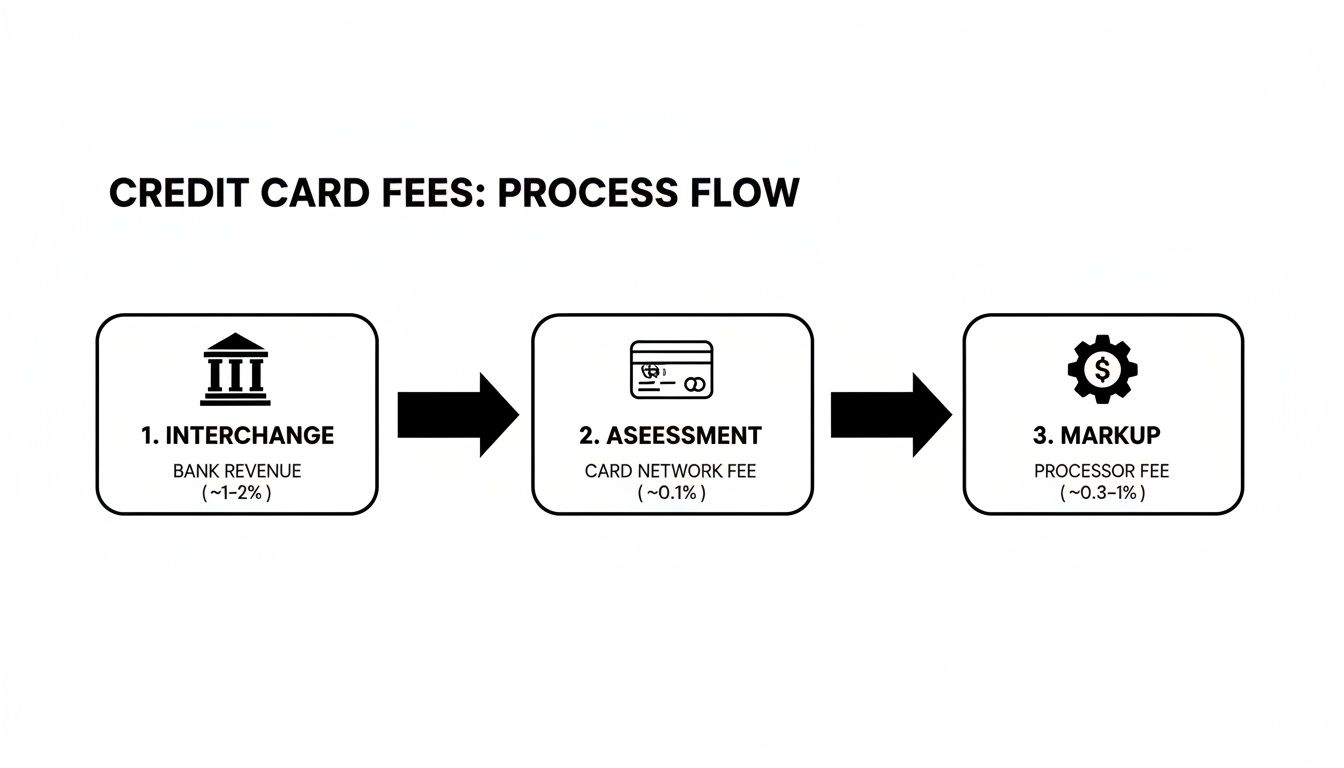
As you can see, the only part you can negotiate is the processor’s markup. The interchange and assessment fees are non-negotiable costs set by the card networks and banks.
Configuring Software and Integration
With your hardware plugged in, it’s time to get the software talking. This is important for businesses using an integrated POS like Pomodo, because it’s what connects your payment processing to your sales and inventory data. Getting this right from the start saves you from manual reconciliation headaches later.
This automation is where an integrated system has an advantage. It cuts out the human error that is common with standalone terminals, where an employee might punch in the wrong sale amount. Here, the data flows, saving time and boosting accuracy. For any business with multiple locations, this sync is essential for keeping stock levels correct across every store.
Testing Your New Payment System
Before you let your first customer pay, you have to test the whole system. Think of it as a final rehearsal. This check confirms everything is working together and can prevent a headache during your busiest hours.
Kick things off by running a small transaction, like $1.00, on your own credit card.
- Does the charge show up correctly on the POS screen?
- Did the card reader process the chip, tap, or swipe without issues?
- Did the processor approve the transaction?
- Did a receipt print out with all your correct business info?
Once you see a successful transaction, immediately void it through your POS system. The final step is to log into your processor’s online portal and confirm that both the transaction and the void were recorded. This full-cycle test proves your system can not only take money but also handle the refunds and voids that are a daily reality for any retail business.
Common Questions About Accepting Credit Cards
Diving into credit card processing for the first time? You’re not alone. It’s natural to have questions. Let’s walk through some of the most common ones we hear from business owners, breaking them down with answers to get you on the right track.
How Long Does It Take to Get Approved?
This is a big one, and the answer depends on where you go.
If you’re working with an integrated provider, the process is usually quick—think one to two business days. They often have a streamlined application because they know your business, which helps them verify your info faster.
On the other hand, going the traditional route through a bank can take longer, sometimes up to a week. There’s more paperwork and a more intensive underwriting review to get through.
Do I Need a Separate Business Bank Account?
While not every processor will demand it, the answer is: yes. A dedicated business bank account is non-negotiable for clean financials. It keeps your business revenue and all those processing fees separated from your personal money. This makes tracking profitability and getting ready for tax season less painful.
When you set up your merchant account, you’ll have to link a bank account for your deposits anyway. Using a business account means every transaction, fee, and chargeback is logged in one place. It creates a clean financial record and makes reconciling your daily sales with your bank statements a breeze.
A separate business account isn’t just a “nice-to-have”—it’s a cornerstone of good financial management. It protects your personal assets and gives you a clear picture of your business’s cash flow.
What Is a Chargeback and How Can I Prevent It?
A chargeback is what happens when a customer disputes a charge with their credit card company. If the bank sides with the customer, they pull the money back out of your account. It’s a double whammy: you lose the sale and you get hit with a chargeback fee from your processor, which can run anywhere from $20 to $100 a pop.
The best defense is a good offense. Being proactive about security and communication is key.
- Use Secure Payments: Always use EMV chip and contactless (NFC) payments for in-person sales. They’re more secure and give you better liability protection against certain kinds of fraud.
- Make Your Name Clear: Check what your business name looks like on a customer’s bank statement. If it’s generic or confusing, people won’t recognize the charge and will dispute it.
- Lean on Great Service: A clear return policy and responsive customer service can head off problems before they become chargebacks. Sometimes, a customer only files a dispute because they feel like they can’t get ahold of you.
- Keep Good Records: Hold onto transaction records, receipts, and any customer communications. This is your evidence if you ever need to fight a chargeback.
Can I Accept Payments Without Internet?
Yes, you can! Many modern POS systems and payment terminals have an offline mode or back up terminals, which is a lifesaver for businesses with flaky internet or for anyone selling at fairs, festivals, or pop-up markets where Wi-Fi is a fantasy.
When your system goes offline, it securely saves the transaction data on the terminal. As soon as you’re back online, it processes everything it stored.
Just be aware of the risks. When you’re offline, the terminal can’t get real-time authorization from the customer’s bank. That means you won’t know if a card is stolen, expired, or maxed out until you reconnect. To limit your risk, most systems let you set a floor limit on how much you’ll accept for an offline transaction.