If you’ve ever had to manually count inventory, you know the drill. You sell something, then you (or an employee) have to remember to mark it down in a separate spreadsheet or a notebook. That gap between the sale and the stock update is where problems start.
POS inventory management closes that gap. It’s not a separate task; it’s what happens when your point-of-sale system and your inventory control become one. Every time you make a sale, the system automatically adjusts your stock levels in real-time. It’s that simple, yet it changes how you manage your business.
Understanding POS Inventory Management
Think about the classic cash register. It’s a tool with one job: to ring up sales and hold cash. It’s a transaction machine. Once that drawer shuts, its job is done. The work of updating inventory logs is a separate, manual chore that has to happen later.
Now, picture a tablet POS. When a cashier scans an item, the system isn’t just calculating a price. It’s acting as the brain of your operation. In that single instant, it processes the payment and tells your inventory database, “Hey, we just sold one of these.” The stock count is updated across your business.
This isn’t just about convenience; it’s about accuracy. That immediate, automated update eliminates the human error and delays that plague manual systems. Instead of waiting until the end of the day to figure out what you have, you get a live picture of your inventory at any given moment.
The Problem With Disconnected Systems
When your sales and inventory systems don’t talk to each other, you’re flying blind. It’s a recipe for disaster that businesses have been struggling with for years. In fact, poor inventory management has been a drag on retail performance, with some analyses showing that retailers can lose 10% to 20% of potential sales to issues like stockouts and overstocks.
Running out of a popular item isn’t just a missed sale—it’s a disappointed customer. Stockouts alone are responsible for an estimated 4% annual revenue loss for many businesses. A POS with inventory management is your first line of defense against these losses, tying every transaction directly to your on-hand stock levels. You can dig deeper into the impact of inventory insights on retail analytics.
This constant flow of information gives you a level of control that was impossible with old methods. It’s the foundation you need for business decisions, like setting up automatic reorder points when stock runs low or using sales data to predict what your customers will want to buy next.
A POS system with inventory management doesn’t just record sales; it interprets them. Each transaction becomes a piece of data that informs purchasing decisions, identifies slow-moving products, and prevents lost revenue from empty shelves.
This table shows how different the day-to-day reality is when you move from a manual system to an integrated POS.
Manual Inventory vs POS Inventory Management
| Feature | Manual Inventory Tracking | POS Inventory Management |
|---|---|---|
| Stock Updates | Done by hand after sales; prone to delays and errors. | Automatic and instant with every transaction. |
| Data Accuracy | Low; relies on human data entry and memory. | High; automated process minimizes human error. |
| Reporting | Time-consuming to compile; often outdated. | Real-time reports on sales, stock, and profits. |
| Labor Costs | High; requires staff time for counting. | Low; automation frees up staff for other tasks. |
| Overselling Risk | High; easy to sell items you no longer have in stock. | Minimal; live data prevents sales of out-of-stock items. |
The contrast is clear. One approach is reactive and full of guesswork, while the other is proactive and data-driven, giving you the tools to manage your business instead of just trying to keep up.
Key Functions of Integration
The power of POS inventory management is how it merges two of the most critical parts of your business into a single loop. Sales data constantly informs and refines your stock control, leading to a smarter operation.
Here’s what that integration does for you:
- Automated Stock Adjustments: Every sale, return, or exchange instantly updates your inventory counts. No more guesswork or manual entry.
- Real-Time Data Visibility: Check current stock levels across one or multiple locations, from your phone or back-office computer.
- Reduced Human Error: Automation takes mistakes out of the equation. Forgetful employees or typos in a spreadsheet no longer cost you money.
- Foundation for Reporting: With clean, live data, you can generate reports that matter—like sales velocity, top-performing products, and inventory turnover.
Core Features of Modern POS Inventory Systems
A POS inventory system isn’t just one tool; it’s a set of features that work together to take the guesswork out of managing your stock. These systems replace manual tasks with automated processes, giving you a picture of what you own and where it is.
Think of it as the central nervous system for your inventory. Every component has a job, from tracking a product the moment it hits your receiving dock to analyzing its sale when it leaves with a customer. When all these pieces are connected, you get a single source of truth that links your stockroom directly to your sales floor. Let’s break down the tools that make a system tick.
Real-Time Stock Tracking
The bedrock of any inventory system is real-time stock tracking. This is what automatically updates your stock levels the second a transaction happens. A sale, a return, a transfer to another store—it doesn’t matter. The system reflects that change instantly.
This immediate feedback loop puts a stop to common headaches like selling an item you just ran out of. It gives you a live, accurate view of your inventory from any device, at any time. No more waiting for end-of-day reports to figure out what you have on hand.
The industry’s shift here has been massive. Cloud-based POS inventory management went from a niche tool to the standard for how businesses control their stock. Projections show that by 2025, cloud POS systems will make up 50–72% of all retail deployments. The POS market is set to grow from US$38.56 billion in 2025 to US$110.22 billion by 2032. You can find more insights on these inventory management trends on DynamicDis.com.
The value of live tracking is simple: it turns your inventory from a static spreadsheet into a dynamic asset. Every decision you make—from running a flash sale to placing your next order—can be based on what’s happening right now, not yesterday.
Automated Purchase Orders
Working hand-in-hand with real-time tracking is automated purchase order (PO) creation. Instead of you walking the aisles with a clipboard to see what’s low, the system can handle it for you. All you have to do is set a minimum stock level, or “reorder point,” for each of your products.
When a sale pushes an item’s count down to that threshold, the system automatically flags it and can even generate a draft PO for you to approve. This keeps your best-sellers from going out of stock, preventing lost sales and disappointed customers. It also frees up administrative time and cuts down on the human error that creeps into manual ordering.
A dashboard like this one gives a manager a quick, at-a-glance view of product performance, making it easy to make purchasing decisions backed by data.
Barcode Scanning and Management
If real-time tracking is the bedrock, then barcode scanning is the engine that makes it all run smoothly and accurately. It’s an action that standardizes how you identify products and wipes out manual data entry errors at every turn.
- Receiving Shipments: A new order arrives from your supplier. Your staff scans the items to add them to your inventory instantly, confirming the delivery matches the PO. For a beer distributor, that means scanning cases and kegs to make sure the count is perfect.
- Conducting Counts: Whether it’s a full physical inventory or a cycle count, scanning items is faster and more accurate than ticking boxes on a piece of paper.
- Processing Sales: At the register, a scan ensures the right item and price are pulled up, which is critical for keeping your stock levels accurate.
That beep of the scanner connects the physical product in your hand to its digital record, keeping your data clean and reliable from start to finish.
Multi-Location Inventory Control
For any business running more than one shop, multi-location inventory management is non-negotiable. This feature gives you a bird’s-eye view of your stock across all your locations from one central dashboard. A business owner can see which stores are running low on an item and which have plenty to spare.
Take a pet store chain, for example. The downtown shop just sold its last bag of a popular dog food, but the system shows the suburban store has ten bags sitting on the shelf. The manager sees this and initiates a stock transfer. The product gets moved where it’s needed, the customer is happy, and a sale is saved. This turns inventory scattered across town into one unified, flexible asset you can move around to maximize sales.
Implementing a POS Inventory Management System
Switching to a new POS inventory management system is a big deal. It’s a project that changes how you run your business day-to-day. The good news is that you can break it down into a few manageable stages. Success comes down to planning, from getting your product data in order to getting your team comfortable with the new tools.
This flowchart shows you how it all works.
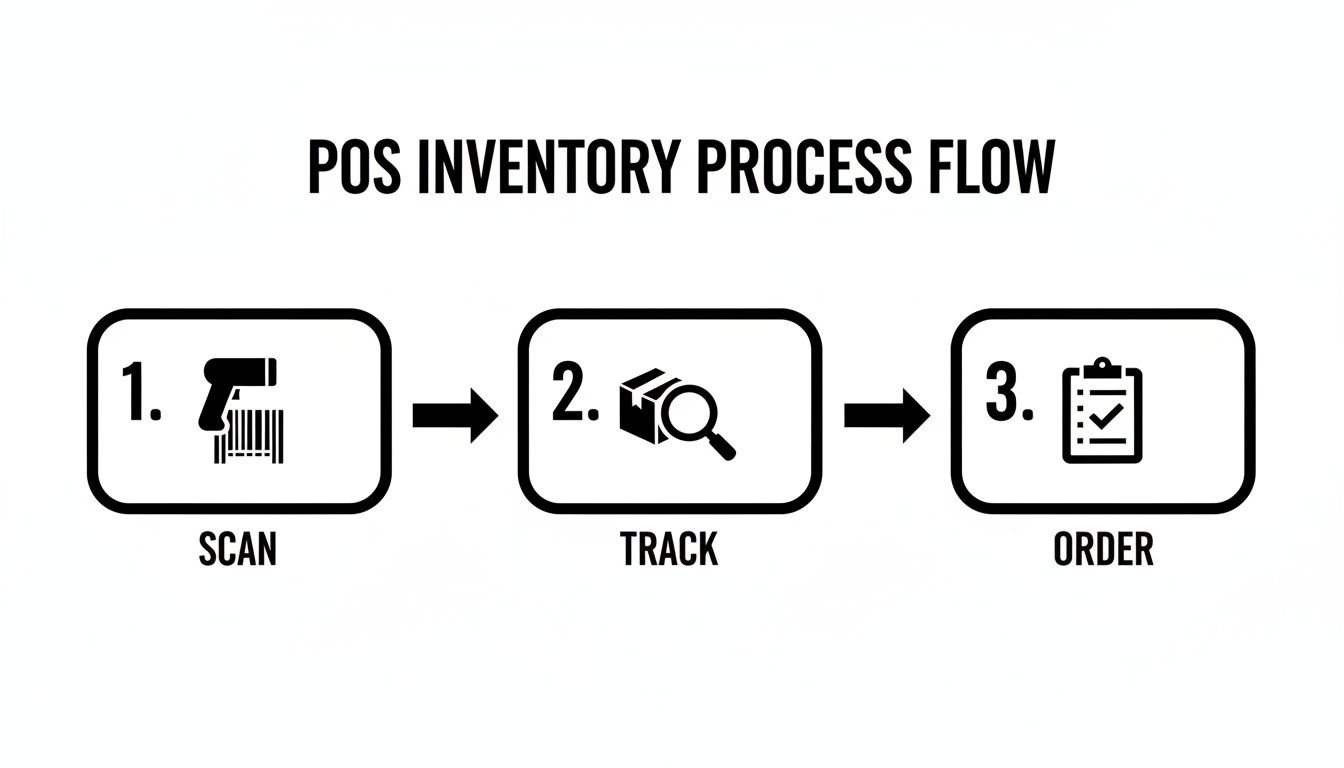
As you can see, it’s a continuous cycle. An item gets scanned at the register, its quantity is tracked in the system, and that data helps you decide what and when to reorder. Every step is connected—a single sale at the checkout ripples back to your purchasing decisions.
Prepare Your Inventory Data
Before you even think about installing software, you need to get your data clean and organized. This is the most critical step for a smooth transition. If you start with messy data, you’ll end up with an inaccurate system, which defeats the purpose of upgrading in the first place.
Your first job is to standardize all your product information. This means creating a consistent format for your SKUs, product names, categories, and supplier info. For a pet supply shop, that could mean making sure all the different sizes and flavors of a dog food are set up as variants under one main product.
Next, you must do a full physical inventory count. This gives you a clean starting point for the new system. Getting that initial count right ensures your stock levels are correct in the POS from day one.
Set Up Hardware and Software
Once your data is ready to go, it’s time to get the physical and digital pieces of the puzzle in place. This is where you’ll be installing your POS terminals, barcode scanners, and receipt printers at your counters and in the back office.
During the software setup, you’ll import all that clean product data you prepared. Most platforms have tools to make this easier. For businesses moving over from an older system like QuickBooks POS, it’s important to understand how the new platform’s import works. Pomodo, for example, provides guidance and tools to ensure a seamless data import process.
This is also when you’ll configure all the settings to match how your business operates. For instance, a fireworks retailer would set up the system to track lot numbers for safety and compliance. A beer distributor, on the other hand, would configure case-break inventory rules to track both full cases and individual bottles.
A common mistake is rushing through the setup. Take the time to configure variants, pricing rules, and user permissions correctly. A well-configured system prevents headaches later on.
Train Your Team and Go Live
A new system is only as good as the people using it. That means team training isn’t just a nice-to-have; it’s essential. Your staff needs to feel comfortable with the new workflow, from ringing up sales and processing returns to checking stock levels and receiving new shipments.
Here’s a tip: consider running the new system alongside your old one for a short period. This gives your employees a low-risk environment to practice on the new interface before it’s the only option. It also acts as a safety net, letting you double-check that sales and inventory totals match up between the two systems.
Once your team feels confident and you’ve verified the new system is humming along accurately, it’s time for the “go live” moment. This is when you officially switch over and run all operations through the new POS.
Best Practices for Effective Inventory Control
Putting a POS system in place is a first step, but getting the most out of it means changing how you think about your stock. POS inventory management isn’t about scrambling to fix problems as they pop up; it’s about building proactive habits that keep those problems from happening in the first place.
These practices will turn your system from a digital cash register into a strategic tool that boosts cash flow and cuts down on waste. It’s time to swap out old, time-consuming manual processes for data-driven workflows that help your bottom line.
Shift from Annual Counts to Cycle Counts
The traditional annual stocktake is a challenge. It usually involves shutting down for a day or more, pulling your team off their jobs, and creating a high-stress scramble where mistakes are almost guaranteed. There’s a better way: cycle counting.
Instead of trying to count everything at once, cycle counting breaks the job into small chunks. You might count one product category this week, and another next week. It’s less disruptive and can become part of your routine.
By counting regularly, you get a flow of accurate data. This lets you spot discrepancies right away. If a count for a specific beer doesn’t match what your system says you have, you can figure out why now—not six months down the road when the trail has gone cold. This ongoing verification keeps your inventory database trustworthy.
Automate Reordering to Prevent Stockouts
Manually trying to remember what to reorder is a recipe for disaster. It’s inefficient and too easy for something to slip through the cracks. One of the smartest things you can do is set up automated reorder points for your products. Think of it as a safety net that stops you from running out of your best-sellers.
For each product, you define the minimum amount you want to have on hand. When a sale drops the quantity down to that level, the system automatically flags it or adds it to a purchase order. This ensures you’ve always got a supply of what people want to buy, without you having to constantly watch over it.
Setting reorder points transforms inventory replenishment from a reactive chore into a proactive, automated process. It ensures customer demand is met consistently, protecting sales and building loyalty.
This kind of automation is a game-changer for keeping your stock levels healthy and preventing the lost sales that come from an empty shelf. It frees you up to focus on the bigger picture, like analyzing sales trends instead of just pushing paper.
Use Sales Data to Manage Seasonal Demand
Your POS system is sitting on a goldmine of information. Using that data to predict and manage seasonal demand is one of the most powerful moves you can make. Your historical sales reports can tell you which products fly off the shelves at certain times of the year, so you can get ready ahead of time.
Take a beer distributor, for instance. They can look at last year’s sales in the weeks leading up to a holiday weekend. They might see that craft IPAs consistently sold 30% more during that period. With that insight, they can bump up their order from the brewery in advance, making sure they’re ready for the rush.
This data-driven approach takes the guesswork out of seasonal buying and helps you dodge two classic inventory mistakes:
- Overstocking: Getting stuck with a mountain of a seasonal item that will be nearly impossible to sell once the season is over.
- Understocking: Missing out on sales simply because you didn’t see a predictable rush coming.
Clear Out Old Stock with Velocity Reports
Not everything in your inventory is a top seller. A part of maintaining healthy cash flow is identifying the products that are just sitting there, gathering dust. This is where sales velocity reports come in. These reports show you how quickly—or slowly—specific items are selling.
By checking these reports regularly, you can pinpoint the products that are tying up your money and your shelf space. Once you know what they are, you can do something about it.
Think about a fireworks retailer. Some products have a short shelf life or just aren’t as popular as they used to be. By running a velocity report, the owner can see which items haven’t moved. They can then run a promotion or create a bundle deal to clear out that old stock before it becomes a loss, making room for new products that will sell. It’s a way to turn a potential loss into revenue.
Sell-Through Rate
The sell-through rate measures the percentage of inventory you’ve sold compared to the amount you received from a supplier over a specific time. It’s useful for judging the performance of individual products or product lines, especially for seasonal goods.
You can figure it out with this formula:
Sell-Through Rate = (Units Sold / Units Received) x 100
A fireworks retailer, for example, would lean on this metric to see if a new product is a dud or a rocket. A high sell-through rate, say 80% or more, shows customer demand. A low rate suggests the product isn’t catching on, giving the retailer a chance to tweak pricing or run a promotion before the season fizzles out. You can learn more about key performance indicators for the retail industry to get an even wider view of important metrics.
By regularly keeping an eye on these three core KPIs using your POS system’s reporting tools, you move beyond simple stock counts. You start managing your inventory with precision, using data to drive growth, boost cash flow, and crank up your profitability.
How Pomodo Solves Common Inventory Challenges
It’s one thing to talk about inventory best practices in theory, but putting them into action requires a tool that’s built for the job. Many businesses get stuck with generic software that doesn’t get the struggles of their industry. This is where a specialized POS inventory management system stops being a “nice-to-have” and becomes a competitive edge.
We designed Pomodo to tackle these inventory headaches head-on, with features born from the realities of specialty retail. The platform is a direct path to getting a better grip on your stock, boosting efficiency, and paving the way for growth.

Tools for Specialized Retailers
Different types of stores face different inventory hurdles. Instead of a one-size-fits-all approach, Pomodo offers dedicated solutions that make sense for your world.
For beer distributors, this means dealing with the nightmare of tracking cases, 6-packs, and single bottles all from the same product. Pomodo’s BeerModo feature handles this case-break inventory automatically, so your counts are always spot-on without the manual math. You can learn more about how to revolutionize your beer store operations with our innovative POS and inventory management software.
For fireworks retailers, it’s all about speed and compliance. The system is built for fast checkouts during seasonal rushes and supports barcode scanning for quick sales. This means you can get more customers through the line without creating a mess of your inventory counts.
The whole point is that the Pomodo POS interface is designed to be quick and intuitive, perfect for any fast-paced retail environment. A clean dashboard gives you a direct view of your stock without having to click through a maze of menus.
Scalability for Growing Businesses
Growth is exciting, but it brings its own set of challenges—especially when you’re adding new locations or jumping into ecommerce. Pomodo is built to scale right alongside you.
- Multi-Location Management: Run all your stores from a single, cloud-based back office. You can transfer stock between locations, pull consolidated reports, and keep your data consistent everywhere, effortlessly.
- Ecommerce Integration: Sync your in-store inventory directly with your online shop. When an online order comes in, it’s pulled right into the POS, and stock levels are updated automatically. No more overselling products you don’t have.
- Seamless Migration: If you’re moving from an older system like QuickBooks POS, we know how daunting that can be. Pomodo offers dedicated support and tools to make the data import process as smooth as possible.
Pomodo is more than just software; we see ourselves as a business partner. With one-on-one training and US-based support, you get the guidance you need to set the system up correctly and use its features to their full potential.
This commitment to service means that as you grow, your POS system is right there with you, supporting that growth every step of the way. You get a platform that adapts to what you need, backed by a team that understands your business.
Got Questions About POS Inventory Management? We’ve Got Answers.
Diving into a new POS inventory system brings up a few questions. For business owners looking to make the switch, getting answers is key to understanding how it all works and what benefits you can expect.
Here are some of the most common things we get asked about.
How Does the System Handle Returns and Exchanges?
This is where automation comes in. When a customer returns an item, the POS system instantly adds it back into your available stock. The transaction gets logged, and your inventory levels are updated in real-time, no manual entry required.
An exchange is two transactions in one step. The system processes the return of the original item (adding it back to stock) and the sale of the new one (deducting it from stock). This dual action keeps the counts for both products accurate, protecting your data integrity.
The real win here is automation. By adjusting stock levels for returns and exchanges on the spot, the system cuts out the manual work that so often leads to mistakes. Your on-hand counts stay correct without you lifting a finger.
Is My Inventory Data Really Secure in the Cloud?
It’s a valid concern, but cloud-based POS systems are designed with security measures to protect your business data. Your information is stored on secure, remote servers managed by the provider, which includes multiple safeguards against data loss or a breach.
You’ll typically find security features like:
- Data Encryption: Your data is scrambled both when it’s traveling over the internet and when it’s stored on the servers.
- User Permissions: You have control over who on your team can see or change sensitive information.
- Regular Backups: Your data is backed up constantly, so if there’s ever an outage, nothing gets lost.
Honestly, this setup often provides a level of security and reliability that would be tough and expensive for a small business to manage with its own on-site server.
What Happens if My Internet Goes Down?
We all know internet connections can be fickle. That’s why many POS systems come with an offline mode to keep you running no matter what. If your connection drops, the system keeps ringing up sales and saves all the transaction data on the terminal.
Once you’re back online, the POS automatically syncs all those offline sales to the cloud. It catches your central inventory database up on everything that happened during the outage. You can keep serving customers without missing a beat, and all your POS inventory management data stays accurate.